

Challenges
Run a checklist of challenges on stream and tick them off from chat, the editor or your phone.
On this page
Challenges puts a run board on your stream: a list of goals in play order, with the current one highlighted. Mark a challenge as won or failed and the board moves on. Great for win runs, boss rushes, viewer dares or a stream-long to-do list.
Each challenge can have a target, so "Win 3 rounds" needs three wins before it counts as done. An optional timer counts up for the challenge you are on.
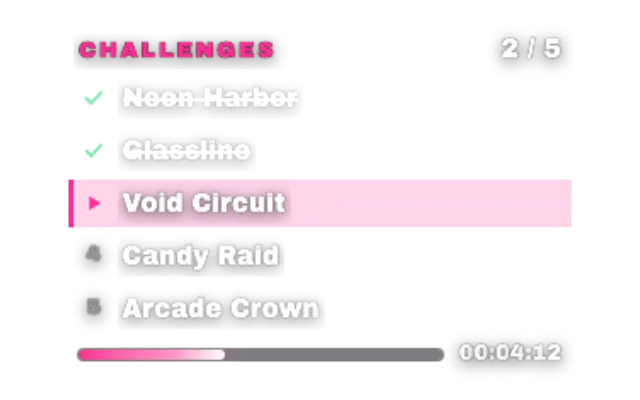
challengeslookstandardAdd it
Click Add in the toolbar (or press W) and pick Challenges under Games & Interactive.
Under Challenges, click Add challenge for each one, in the order you want to play them. Names must be unique; up to 12 fit on a board.
Set a Target for challenges that need several wins.
Give the board a Title and pick a look with Choose a look.
Run it live
Click a row in the preview to check it off. When the widget is selected, Win, Fail and Refill sit above it; Refill clears the results and the timer but keeps your list. The same buttons are in the Deck and on a Stream Deck.
Chat commands
The default command word is win. You and your mods can use:
| Command | What it does |
|---|---|
!win | Mark the current challenge won |
!winfail | Mark the current challenge failed |
!winundo | Undo the last win |
!wincheck 3 | Check or uncheck challenge 3 |
!win 3 | Add a win to challenge 3 |
!winreset | Reset results and timer, keep the list |
!wintimer | Start or stop the timer |
Change the word under Command word and who may use it under Who can use commands.
Tips
- Show won challenges off hides cleared rows without changing the board size.
- Hide when complete removes the board once everything is done.
- Add a Win sound and a Complete sound for the big moments.
- Clear moment sets how loud the celebration is when you clear a challenge.
Looks
Pick a look under Look in the settings card. Every look is a complete style; colors and fonts you set yourself stay on top. 15 looks are available:
Command reference
Every chat command this widget understands, with the default command names. Values in angle brackets are placeholders, for example a number.
| Command | What it does |
|---|---|
!win | Mark current won |
!wincheck 3 | Check or uncheck challenge N |
!winundo | Undo last win |
!winset 3 | Set won to the first N challenges |
!winfail | Mark current failed |
!win 3 | Add a win to challenge N |
!winfail 3 | Fail or reopen challenge N |
!winreset | Reset results and timer, keeping challenges |
!wintimer | Start or stop the timer |
!winempty | Mark every challenge won |
!wincolor #22d3ee | Change the accent color |
Settings
All settings live in the floating settings card on the right of the editor. Defaults are what a new widget starts with.
Board
| Setting | Default | Values | Notes |
|---|---|---|---|
| Title | Challenges | Text | Shown above the board. Leave empty for none. |
| Challenges | Empty | Up to 12 items | One challenge per row, in play order. Unique names. Click a row in the preview to check it off. |
| Show won challenges | On | On or off | Off hides cleared challenges without changing the board size. |
| Hide when complete | Off | On or off | |
| Show timer | On | On or off | Count-up for the current challenge. Starts from chat or the Deck. |
Design
| Setting | Default | Values | Notes |
|---|---|---|---|
| Accent color | Look default | Any color | Empty keeps the look's own accent. |
| Width (px) | 300 | 220 to 800 | |
| Scale (%) | 32 | 16 to 64 | |
| Compact rows | Off | On or off | |
| Clear moment | Full | Full, Subtle, Off |
Chat
| Setting | Default | Values | Notes |
|---|---|---|---|
| Command word | win | Text | |
| Chat channels | All connected channels | Your connected Twitch, Kick and YouTube channels | |
| Who can use commands | Broadcaster, Moderators | Broadcaster, Moderators, VIPs, Subscribers, Everyone |
Sound
| Setting | Default | Values | Notes |
|---|---|---|---|
| Win sound | Empty | Text | |
| Complete sound | Empty | Text | |
| Sound volume | 70 | 0 to 100 | Upload or paste a sound first. |
Was this page helpful?