

Points Leaderboard
Show the viewers with the most loyalty points as a live list, podium or ticker.
On this page
The Points Leaderboard shows who has collected the most loyalty points with PXStudioBot. Rows move as points change and a new leader gets a moment of fame. It gives regulars a reason to stick around and chat.
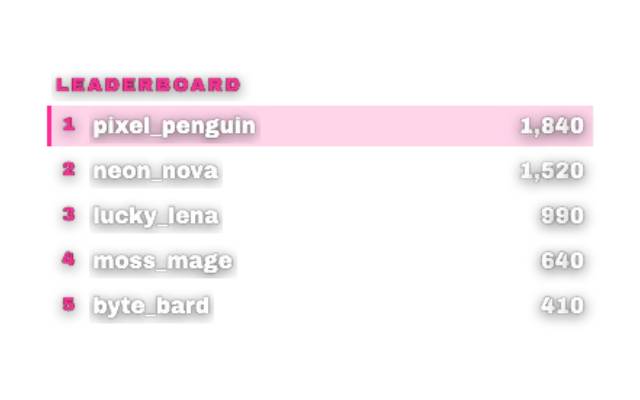
pixbot-points-leaderboardlookstandardAdd it
Make sure points are on in the Loyalty tab of the bot panel (toolbar PXStudioBot, B). They are on by default.
Click Add in the toolbar (or press W) and pick Points Leaderboard under Alerts & Goals.
Choose what to Show and how many Rows.
Pick a look with Choose a look and drag it into place.
Layouts
| Show | Best for |
|---|---|
| Full list | A sidebar with several rows |
| Top 3 | A short board in a corner |
| Podium | A big moment on a BRB or Ending scene |
| Ticker | A scrolling line along the edge |
How it works
Points come straight from your loyalty system and update live. Viewers earn them by watching and chatting, plus bonuses for follows, subs, raids and Bits, see Loyalty and giveaways.
In the editor you see a demo board so you can style it before anyone has points. On stream, only real standings show, and an empty board stays quiet instead of showing placeholder text.
Make it yours
- Title and Top line set the heading.
- Show points and Show changes add the numbers and how they moved.
- Highlight me with Your name pins your own row below the board when you are outside the visible rows.
- New leader moment controls the celebration when first place changes.
- Compact rows, Width (px) and Scale (%) fit it into tight spots.
Tips
- Overlays that still use Next Reward can show next to it what points buy.
- In chat,
!pointsand!topshow points and the top viewers, see bot commands.
Looks
Pick a look under Look in the settings card. Every look is a complete style; colors and fonts you set yourself stay on top. 15 looks are available:
Settings
All settings live in the floating settings card on the right of the editor. Defaults are what a new widget starts with.
Text
| Setting | Default | Values | Notes |
|---|---|---|---|
| Title | Leaderboard | Text | |
| Top line | Empty | Text |
Layout
| Setting | Default | Values | Notes |
|---|---|---|---|
| Show | Full list | Full list, Top 3, Podium, Ticker | |
| Rows | 5 | 1 to 10 | |
| Compact rows | Off | On or off | |
| Show points | On | On or off | |
| Show changes | On | On or off | |
| Highlight me | Off | On or off | |
| Your name | Empty | Text | Pinned below the board when you're outside the visible rows. |
Design
| Setting | Default | Values | Notes |
|---|---|---|---|
| Accent color | Look default | Any color | |
| Width (px) | 380 | 200 to 900 | |
| Scale (%) | 32 | 16 to 64 | |
| New leader moment | Full | Full, Subtle, Off |
Was this page helpful?