

Subathon
Run a subathon clock that subs, Bits, tips and raids extend, plus sub goals, donation totals and milestones.
On this page
The Subathon widget runs your subathon. The clock counts down, and every sub, Bit, tip or raid adds time. The stream goes on as long as your community keeps the clock alive.
One widget shows one part of the subathon. Add it several times to show the clock, the sub goal, the donation total, your top supporter and a milestone list side by side. They all share the same data.
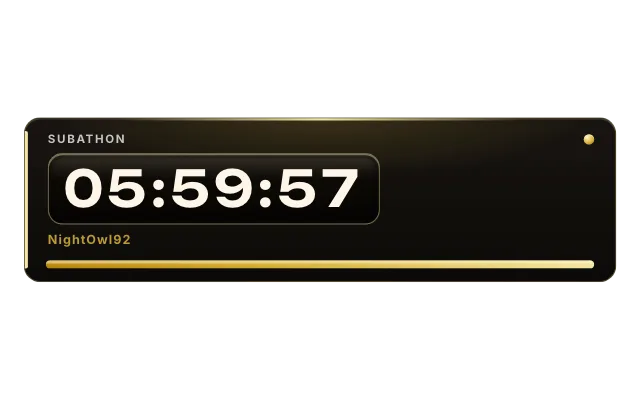
subathonlookglassSet it up
Select the widget on an overlay that already has it.
Under What this widget shows, pick Subathon clock.
Set the Starting time (hours) and Starting time (minutes), and your Currency.
The clock starts paused. When you go live, click Start / Pause above the widget or type
!sub resumein chat.
What adds time
| Setting | Default |
|---|---|
| Minutes per Tier 1 sub (Prime counts as Tier 1) | 5 |
| Minutes per Tier 2 sub | 10 |
| Minutes per Tier 3 sub | 25 |
| Minutes per gifted sub | 5 |
| Minutes per 100 bits | 5 |
| Minutes per currency unit | 5 |
| Minutes per raid (0 = off) | 10 |
| Minutes per follow | 0 |
Time cap (hours) limits the total (0 means no limit). Warn below (minutes) flags the final stretch, and Text at zero replaces the clock when it runs out.
Show more than the clock
Add another Subathon widget and change What this widget shows:
- Sub Goal counts subs toward a goal that rises by Raise goal by each time you hit it.
- Donation Total adds up tips. Value of 100 bits lets Bits count too.
- Top & Latest Supporter shows your biggest and newest supporter.
- Milestone List lists rewards like
100 | Chat picks my game, separated with;.
Widgets with the same Link ID share one subathon. Change it only if you run two subathons at once.
Chat commands
Only you and your mods can use these. The default prefix is sub:
| Command | What it does |
|---|---|
!sub resume / !sub pause | Start or pause the clock |
!sub toggle | Pause if running, resume if paused |
!sub addtime 10m | Add time, also 1h30m |
!sub removetime 10m | Remove time |
!sub settime 1h30m | Set an exact time |
!sub addsubs 3 | Add subs to the sub goal |
!sub adddono 20 | Add to the donation total |
!sub reset | Reset the whole subathon |
Change the prefix under Command prefix.
Tips
- Select the widget for Start / Pause, Reset and test buttons. They also work from the Deck and a Stream Deck.
- Add a Sound that plays whenever time is added.
- For a simple countdown without subathon rules, use the Countdown in Built-in elements.
Looks
Pick a look under Look in the settings card. Every look is a complete style; colors and fonts you set yourself stay on top. 7 looks are available:
Command reference
Every chat command this widget understands, with the default command names. Values in angle brackets are placeholders, for example a number.
| Command | What it does |
|---|---|
!sub addtime <10m/1h30m> | Add time to the timer |
!sub removetime <10m/1h30m> | Remove time from the timer |
!sub settime <10m/1h30m> | Set the timer to an exact duration |
!sub pause | Pause the timer |
!sub resume | Resume (or start) the timer |
!sub toggle | Pause the timer if it is running, resume it if it is paused (one command for both) |
!sub addsubs <n> | Add subs to the sub-goal counter |
!sub adddono <amount> | Add to the donation total |
!sub subgoal <n> | Set a new sub goal |
!sub reset | Reset the whole subathon (timer, subs, donations, milestones) |
!sub done <1> | Manually mark milestone N as done (1-based) |
!sub undone <1> | Undo a manual milestone-done mark (does not un-earn a donation total that already cleared it) |
Settings
All settings live in the floating settings card on the right of the editor. Defaults are what a new widget starts with.
Subathon
| Setting | Default | Values | Notes |
|---|---|---|---|
| Chat channels | All connected channels | Your connected Twitch, Kick and YouTube channels | |
| What this widget shows | Subathon clock | Subathon clock, Sub Goal, Donation Total, Top & Latest Supporter, Milestone List | |
| Link ID | 1 | Text | Same ID shares one timer. Change only to run two subathons. |
| Command prefix | !sub | Text | Only mods and you can use these commands in chat. |
| Currency | Euro (€) | Euro (€), US Dollar ($), Pound (£), Swiss Franc (CHF), Swedish Krona (kr), Norwegian Krone (kr), Danish Krone (kr), Zloty (zł) and 6 more | Euro is 5 €. Dollar is $5. |
| Symbol | € | Text | Set Currency to "Something else" to use this. |
| Symbol after amount | Off | On or off | On: 5 kr. Off: kr5. Set Currency to "Something else" to use this. |
Timer
| Setting | Default | Values | Notes |
|---|---|---|---|
| Starting time (hours) | 6 | 0 to 8760 | Only used when the module above is set to "Subathon clock". |
| Starting time (minutes) | 0 | 0 to 59 | Only used when the module above is set to "Subathon clock". |
| Start paused | On | On or off | Only used when the module above is set to "Subathon clock". |
| Time cap (hours) | 0 | 0 to 8760 | 0 means no limit. Only used when the module above is set to "Subathon clock". |
| Warn below (minutes) | 10 | 0 to 120 | Only used when the module above is set to "Subathon clock". |
| Text at zero | THANK YOU | Text | Only used when the module above is set to "Subathon clock". |
Timer bonuses
| Setting | Default | Values | Notes |
|---|---|---|---|
| Minutes per Tier 1 sub | 5 | 0 to 600 | Prime subs count as Tier 1. Only used when the module above is set to "Subathon clock". |
| Minutes per Tier 2 sub | 10 | 0 to 600 | Only used when the module above is set to "Subathon clock". |
| Minutes per Tier 3 sub | 25 | 0 to 600 | Only used when the module above is set to "Subathon clock". |
| Minutes per gifted sub | 5 | 0 to 600 | Only used when the module above is set to "Subathon clock". |
| Minutes per 100 bits | 5 | 0 to 600 | Only used when the module above is set to "Subathon clock". |
| Minutes per currency unit | 5 | 0 to 600 | Only used when the module above is set to "Subathon clock". |
| Minutes per raid (0 = off) | 10 | 0 to 600 | Only used when the module above is set to "Subathon clock". |
| Minutes per follow | 0 | 0 to 600 | Follows are free, so a low value can be farmed. Only used when the module above is set to "Subathon clock". |
Sub Goal
| Setting | Default | Values | Notes |
|---|---|---|---|
| Starting goal | 50 | 0 to 10000 | Only used when the module above is set to "Sub Goal". |
| Raise goal by | 25 | 0 to 10000 | Only used when the module above is set to "Sub Goal". |
| How the sub goal is shown | Counter (X / Y) | Counter (X / Y), Progress bar | Only used when the module above is set to "Sub Goal". |
Donations
| Setting | Default | Values | Notes |
|---|---|---|---|
| Value of 100 bits | 0 | 0 to 10000 | 0 leaves bits out of the donation total. Only used when the module above is set to "Donation Total". |
Supporters
| Setting | Default | Values | Notes |
|---|---|---|---|
| Top supporter label | TOP | Text | Only used when the module above is set to "Top & Latest Supporter". |
| Label for latest supporter | LATEST | Text | Only used when the module above is set to "Top & Latest Supporter". |
Milestones
| Setting | Default | Values | Notes |
|---|---|---|---|
| Donation milestones | 100 / Chat picks my game; 150 / Cozy karaoke session; 200 / Movie night on Discord; 250 / 24h stream extension | One per line: amount, then what happens | Amount / reward, separate entries with ;. Only used when the module above is set to "Milestone List". |
| Hide completed entries | Off | On or off | Only used when the module above is set to "Milestone List". |
| List width (px) | 640 | 320 to 960 | Only used when the module above is set to "Milestone List". |
Design
| Setting | Default | Values | Notes |
|---|---|---|---|
| Show background plate | Off | On or off |
Style
| Setting | Default | Values | Notes |
|---|---|---|---|
| Font | Inter | Baloo 2, Nunito, Quicksand, Inter, Geist, Sora, Bricolage Grotesque, Unbounded and 6 more | |
| Card background | #FFF8F0 | Any color | Only used by the Pastel theme - Nocturne and Ember ship their own palettes. |
| Text | #5A4A66 | Any color | Only used by the Pastel theme - Nocturne and Ember ship their own palettes. |
| Pink accent | #FF8FC8 | Any color | Only used by the Pastel theme - Nocturne and Ember ship their own palettes. |
| Lavender accent | #C9B8F5 | Any color | Only used by the Pastel theme - Nocturne and Ember ship their own palettes. |
| Mint accent | #A8E6CF | Any color | Only used by the Pastel theme - Nocturne and Ember ship their own palettes. |
Sound
| Setting | Default | Values | Notes |
|---|---|---|---|
| Sound | Empty | Text | Plays when time is added. |
| Sound volume | 70 | 0 to 100 | Upload or paste a sound first. |
Was this page helpful?