

Next Reward
Show the cheapest reward in your loyalty shop so viewers know what their points can buy next.
On this page
Next Reward is a small card that shows the cheapest reward in your PXStudioBot loyalty shop. It reminds viewers that their points are worth something and nudges them to keep watching and chatting.
The card always shows your real shop. If the shop is empty, it says so instead of making up a prize.
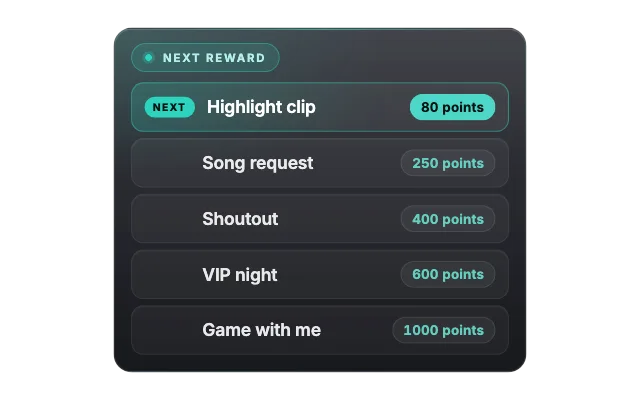
pixbot-next-rewardlookglassSet it up
Set up rewards in the Loyalty tab of the bot panel (toolbar PXStudioBot, B). Viewers buy them with
!redeem.Select the widget on an overlay that already has it.
Change the Title if you like and pick a look with Choose a look.
Drag the card into place.
How it works
The widget picks the cheapest enabled reward from your loyalty shop and updates on its own when you add, change or turn off rewards. There is nothing to control during the stream.
In the editor preview you see a demo shelf with a few extra rows. On stream, only your real next reward shows.
Make it yours
- Title is the line above the reward, "Next reward" by default.
- Empty shop text is what shows when no reward is enabled, "Shop is empty" by default.
- Accent color, Text color and Card width (px) fit it to your layout.
- Most looks also let you pick a Font.
Tips
- Pair it with the Points Leaderboard so viewers see both the race and the prize.
- Points are on by default for every channel. Viewers earn them by watching and chatting, see Loyalty and giveaways.
- Give your cheapest reward a catchy name: it is the one viewers see on stream.
Looks
Pick a look under Look in the settings card. Every look is a complete style; colors and fonts you set yourself stay on top. 7 looks are available:
Settings
All settings live in the floating settings card on the right of the editor. Defaults are what a new widget starts with.
Text
| Setting | Default | Values | Notes |
|---|---|---|---|
| Title | Next reward | Text | |
| Empty shop text | Shop is empty | Text | Never replaced with a fake prize. |
Design
| Setting | Default | Values | Notes |
|---|---|---|---|
| Accent color | #2dd4bf | Any color | |
| Font | Inter | Baloo 2, Nunito, Quicksand, Inter, Geist, Sora, Bricolage Grotesque, Unbounded and 6 more | Glass and Retro Arcade use their own fonts. |
| Card width (px) | 400 | 400 to 720 |
Was this page helpful?