

Spin Wheel
Spin a prize wheel live, by hand or automatically when subs, Bits and tips fill the meter.
On this page
The Spin Wheel is a prize wheel for your stream. Fill it with dares, rewards or game choices, then spin it yourself or let your community earn spins with subs, Bits and tips. A countdown builds the tension, the wheel spins and the result stays on screen for a few seconds.
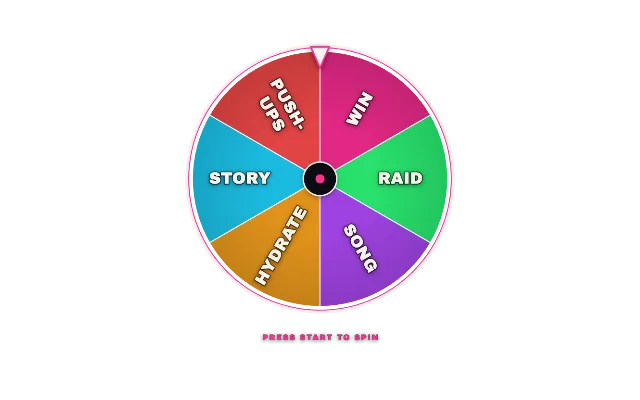
spin-wheellookstandardAdd it
Click Add in the toolbar (or press W) and pick Spin Wheel under Games & Interactive.
Under Wheel entries, edit the sample entries and click Add entry for more, up to 24.
Give an entry a higher Weight (higher = bigger slice) to make it more likely. A weight of 3 is three times as likely as a weight of 1, and its slice is three times as wide.
Pick a look with Choose a look and set the Wheel size (px).
Spin it
Select the widget and Start, Stop and Reset appear above it. Start runs the countdown and spins; Stop halts the countdown or spin without picking a winner; Reset clears the point meter. The same buttons are in the Deck and on a Stream Deck.
You and your mods can use chat too:
!spinstarts a spin!wheel stopstops the current countdown or spin!wheel resetclears the point meter and returns to idle
Let viewers earn spins
Turn on Enable viewer points and the wheel gets a point meter. Support fills it:
| Setting | Default |
|---|---|
| Points per sub (includes resubs and gifted subs) | 50 |
| Points per 100 bits | 10 |
| Points per 1.00 tipped | 10 |
| Points needed for one spin | 150 |
When the meter reaches the goal, the wheel spins on its own. Several spins earned at once wait in line. You can always spin by hand as well.
Timing
- Countdown (seconds) is the wait before the spin. 0 spins instantly.
- Spin duration (seconds) sets how long the wheel turns.
- Winner display (seconds) sets how long the result stays.
Tips
- Layout set to Wheel only hides the status line and the point meter.
- The Test buttons above the widget (Sub, Gift x5, Bits, Tip) show a sample spin without touching the real meter.
- Mute tick & win sounds is also a quick toggle under Test.
- Keep entries short so they fit their slice.
Looks
Pick a look under Look in the settings card. Every look is a complete style; colors and fonts you set yourself stay on top. 15 looks are available:
Command reference
Every chat command this widget understands, with the default command names. Values in angle brackets are placeholders, for example a number.
| Command | What it does |
|---|---|
!spin | Start: spin the wheel |
!wheel stop | Stop: halt the current countdown or spin |
!wheel reset | Reset: clear the point meter and return to idle |
Settings
All settings live in the floating settings card on the right of the editor. Defaults are what a new widget starts with.
General
| Setting | Default | Values | Notes |
|---|---|---|---|
| Chat channels | All connected channels | Your connected Twitch, Kick and YouTube channels |
Style
| Setting | Default | Values | Notes |
|---|---|---|---|
| Layout | Wheel + base | Wheel + base, Wheel only | Wheel only hides the status line and the point meter. |
| Wheel size (px) | 560 | 280 to 900 | |
| Accent color | Look default | Any color | Empty keeps the look's own accent. |
| Celebration | Full (text + particles) | Full (text + particles), Subtle (flash only) |
Wheel
| Setting | Default | Values | Notes |
|---|---|---|---|
| Wheel entries | 6 items | Up to 24 items |
Points
| Setting | Default | Values | Notes |
|---|---|---|---|
| Enable viewer points | Off | On or off | Optional viewer points earn spins; you can always spin manually. |
| Points needed for one spin | 150 | 10 to 1000 | Turn on viewer spins to edit this. |
| Points per sub | 50 | 0 to 200 | Includes resubs and gifted subs. Turn on viewer spins to edit this. |
| Points per 100 bits | 10 | 0 to 200 | Turn on viewer spins to edit this. |
| Points per 1.00 tipped | 10 | 0 to 200 | Turn on viewer spins to edit this. |
Spin
| Setting | Default | Values | Notes |
|---|---|---|---|
| Countdown (seconds) | 3 | 0 to 10 | 0 spins instantly. |
| Spin duration (seconds) | 5 | 3 to 10 | |
| Winner display (seconds) | 8 | 2 to 30 |
Sound
| Setting | Default | Values | Notes |
|---|---|---|---|
| Mute tick & win sounds | Off | On or off | |
| Sound volume (%) | 60 | 0 to 100 | Unmute to set volume. |
Was this page helpful?