

Goal Bar
Show progress toward a follower, sub, Bits, tip or custom goal that fills up live as your chat pushes it.
On this page
The Goal Bar gives your viewers something to push for. It fills up as follows, subs, Bits or tips come in, celebrates when the target is reached and can move on to the next goal by itself.
Use it for a sub goal on stream day, a monthly donation goal or a custom goal you count by hand.
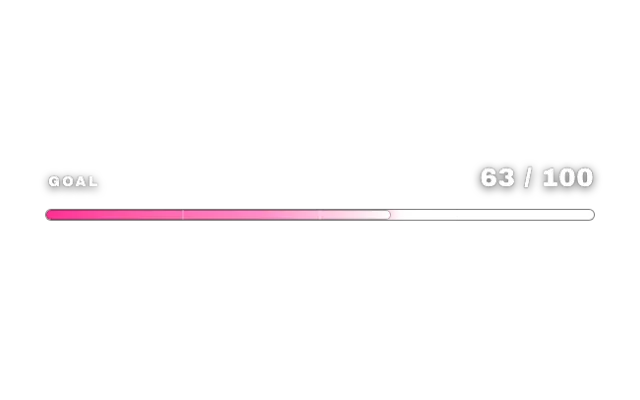
goal-barlookstandardAdd it
Click Add in the toolbar (or press W) and pick Goal Bar under Alerts & Goals.
In the settings card, choose the Goal type and set the Goal target.
Pick a Goal period: this stream, all-time, daily, weekly or monthly.
Drag the bar into place and choose a look with Choose a look.
Goal types
| Goal type | Where the number comes from |
|---|---|
| Follower goal | Twitch follower totals |
| Sub goal | Twitch sub totals plus new sub events |
| Bits / Kicks | Bits and Kicks as they arrive |
| Donation goal | Your Ko-fi donations |
| Custom goal | Only you and your mods, with chat commands |
| Points | Loyalty points your viewers collect with PXStudioBot |
Follower and sub totals need Twitch connected under Twitch live totals; the donation goal needs Ko-fi donations. For sub goals, Sub goals count decides whether every sub counts as 1 or as sub points (Tier 2 = 2, Tier 3 = 6).
This stream follows your Twitch go-live. Daily, weekly and monthly goals reset at the Reset hour (0-23); Points goals use UTC midnight instead.
Chat commands
You and your mods can change the bar from chat. The default command word is goal; change it under Command word and Who can use commands.
!goaladd 5and!goalsub 5add or subtract!goalset 50sets the value directly!goalmax 200changes the target!goalresetresets value and goal
Select the widget and the same controls show up above it: a value stepper, Reset, test events for follow, sub, Bits and tips, and Set target. They are also available in the Deck and on a Stream Deck.
Goal chains and milestones
- Raise goal by bumps the target automatically every time it is reached.
- Goal chain runs several goals in a row, written as
Follower Goal:100;Sub Goal:150. - Milestones mark up to four steps on the bar, each with its own name and percentage.
- Title format and Detail text take tokens like
{current},{goal},{remaining}and{percent}.
Tips
- Show on activity only hides the bar until something happens, then keeps it visible for a few seconds.
- Celebrate how often set to Once per stream keeps the celebration special.
- Turn on Vertical bar for a thermometer next to your camera.
- Want several goals at once? Add one Goal Bar per goal, see Goals, timers and counters.
Looks
Pick a look under Look in the settings card. Every look is a complete style; colors and fonts you set yourself stay on top. 15 looks are available:
Command reference
Every chat command this widget understands, with the default command names. Values in angle brackets are placeholders, for example a number.
| Command | What it does |
|---|---|
!goaladd 5 | Add to the current value |
!goalsub 5 | Subtract from the current value |
!goalset 50 | Set the current value directly |
!goalmax 200 | Change the goal target |
!goalreset | Reset value and goal |
Settings
All settings live in the floating settings card on the right of the editor. Defaults are what a new widget starts with.
Content
| Setting | Default | Values | Notes |
|---|---|---|---|
| Goal type | Follower goal (Twitch totals) | Follower goal (Twitch totals), Sub goal (Twitch totals + events), Bits / Kicks (events), Donation goal (Ko-fi), Custom goal (mod commands only), Points | Twitch totals need Twitch connected. |
| Goal target | 100 | 1 to 10000000 | |
| Goal period | This stream (Twitch go-live) | This stream (Twitch go-live), All-time (never reset), Daily, Weekly (Mondays), Monthly (on the 1st) | This stream follows Twitch go-live; Points use the server clock (UTC midnight). |
| Reset hour (0-23) | 4 | 0 to 23 | Local hour other goals reset at - Points ignore this. Only used for daily, weekly or monthly periods. |
| Sub goals count | Subs (1 per sub) | Subs (1 per sub), Sub points (Tier 2 = 2, Tier 3 = 6) | Only used when the goal type is "Sub goal". |
| Rarity label | On | On or off | Show the decorative rarity text, such as COMMON or LEGENDARY. Used by the Loot Drop look. |
| Common label | COMMON | Text | Decorative Loot Drop detail. |
| Rare label | RARE | Text | Decorative Loot Drop detail. |
| Epic label | EPIC | Text | Decorative Loot Drop detail. |
| Legendary label | LEGENDARY | Text | Decorative Loot Drop detail. |
| Title | Empty | Text | |
| Title format | Empty | Text | Optional: {label}, {current}, {goal}, {remaining}, {percent}, {next}, {last}, {top}, {eta}. |
| Raise goal by | 0 | 0 to 10000000 | |
| Goal chain | Empty | Text | Steps as "Follower Goal:100;Sub Goal:150". |
| Detail text | Empty | Text | Optional extra line, for example: {remaining} to go. |
| Deadline | Empty | Text |
Appearance
| Setting | Default | Values | Notes |
|---|---|---|---|
| Background plate | On | On or off | Used by Loot Drop. |
| Title font | Look default | Look default, Baloo 2, Nunito, Quicksand, Inter, Geist, Sora, Bricolage Grotesque and 7 more | Used by Loot Drop. |
| Value font | Look default | Look default, Baloo 2, Nunito, Quicksand, Inter, Geist, Sora, Bricolage Grotesque and 7 more | Used by Loot Drop. |
| Detail font | Look default | Look default, Baloo 2, Nunito, Quicksand, Inter, Geist, Sora, Bricolage Grotesque and 7 more | Used by Loot Drop. |
| Compact strip | Off | On or off | |
| Show | Label, bar and value | Label, bar and value, Bar and value, Bar only, Value only | |
| Vertical bar | Off | On or off | |
| Bar height (px) | 400 | 200 to 900 | Only used by the vertical bar. |
| Scale (%) | 32 | 16 to 64 | |
| Bar width (px) | 560 | 240 to 1200 | |
| Number style | 12,345 | 12,345, 12.3k, Currency | |
| Currency code | EUR | Text | Only used by the currency number style. |
| Accent color | Look default | Any color | |
| Label icon | No icon | Match the goal type, Heart (follows), Star (subs), Diamond (bits), Coin (tips), Medal (points), Flag (custom), No icon | |
| Celebration | Full (text + particles) | Full (text + particles), Subtle (flash only), Off | |
| Celebrate how often | Once per stream | Once per stream, Every time | Only used when celebrations are on. |
| Show on activity only | Off | On or off | |
| Stay visible (s) | 8 | 2 to 120 | Only used with "Show on activity only". |
Milestones
| Setting | Default | Values | Notes |
|---|---|---|---|
| Milestone 1 | Empty | Text | |
| Milestone 1 at (%) | 25 | 1 to 100 | Name the milestone first. |
| Milestone 2 | Empty | Text | |
| Milestone 2 at (%) | 50 | 1 to 100 | Name the milestone first. |
| Milestone 3 | Empty | Text | |
| Milestone 3 at (%) | 75 | 1 to 100 | Name the milestone first. |
| Milestone 4 | Empty | Text | |
| Milestone 4 at (%) | 100 | 1 to 100 | Name the milestone first. |
Live data
| Setting | Default | Values | Notes |
|---|---|---|---|
| Twitch live totals | Not connected | Connect Twitch | Only used by follower and sub goals. |
| Ko-fi donations | Not connected | Connect Ko-fi | Only used by the Donation goal (Ko-fi). |
Chat commands
| Setting | Default | Values | Notes |
|---|---|---|---|
| Command word | goal | Text | |
| Chat channels | All connected channels | Your connected Twitch, Kick and YouTube channels | |
| Who can use commands | Broadcaster, Moderators | Broadcaster, Moderators, VIPs, Subscribers, Everyone |
Sound
| Setting | Default | Values | Notes |
|---|---|---|---|
| Sound | Empty | Text | |
| Sound volume | 70 | 0 to 100 | Upload or paste a sound first. |
| Sound on milestones | Off | On or off | Upload or paste a sound first. |
Was this page helpful?